Official facts + expanded gameplay review
Nuke A Country Shields & Base Defense
Check reported forcefield timers, plan shield spending and understand what still needs verification about player attacks and alliances.
Quick answer
The recorded FORCEFIELD panel warns that bought shields switch off when you attack during combat. Check protection status and the cash-loss warning before spending or disconnecting.
Continue readingWork through the steps
Use the current on-screen prompts and confirm each result.
Read the forcefield timer
Read your countdown and the FORCEFIELD combat warning before attacking.
- Success check
- You know whether protection is active and what attacking will do to it.
- If it remains unclear
- Assume no paid protection after combat begins until the interface confirms otherwise.
Read the supporting evidence
§Read the forcefield timer#
The FORCEFIELD generator is the large glowing machine on your island with a shield icon and countdown. Approach it and use the Forcefield interaction. The panel distinguishes an active timer from OFF. An available purchase card does not confirm active protection.
The panel warns that bought shields switch off during combat when you attack. Decide whether you are protecting an earning period or preparing another attack before buying. Reopen the panel after attacking and confirm its state.
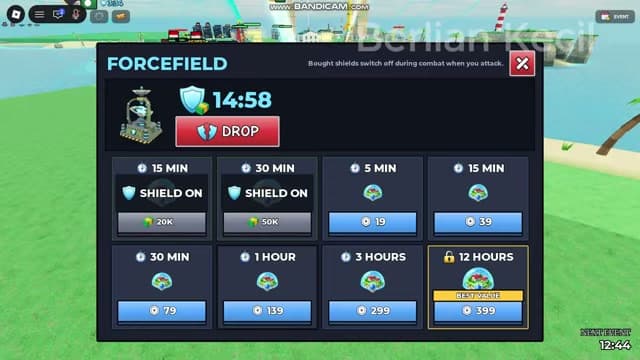
The newer recording shows a cash purchase changing the countdown from 1:31 to 14:58, with SHIELD ON on the cash buttons. This before-and-after state supplies a concrete success check. Your current countdown determines the remaining protection.
Before buying more protection
Compare the live currency, price and duration, then confirm protection status.
- Success check
- A current countdown or active state confirms the purchase outcome.
- If it remains unclear
- Check OFF, NEED CASH and the payment response before trying another purchase.
Read the supporting evidence
§Before buying more protection#
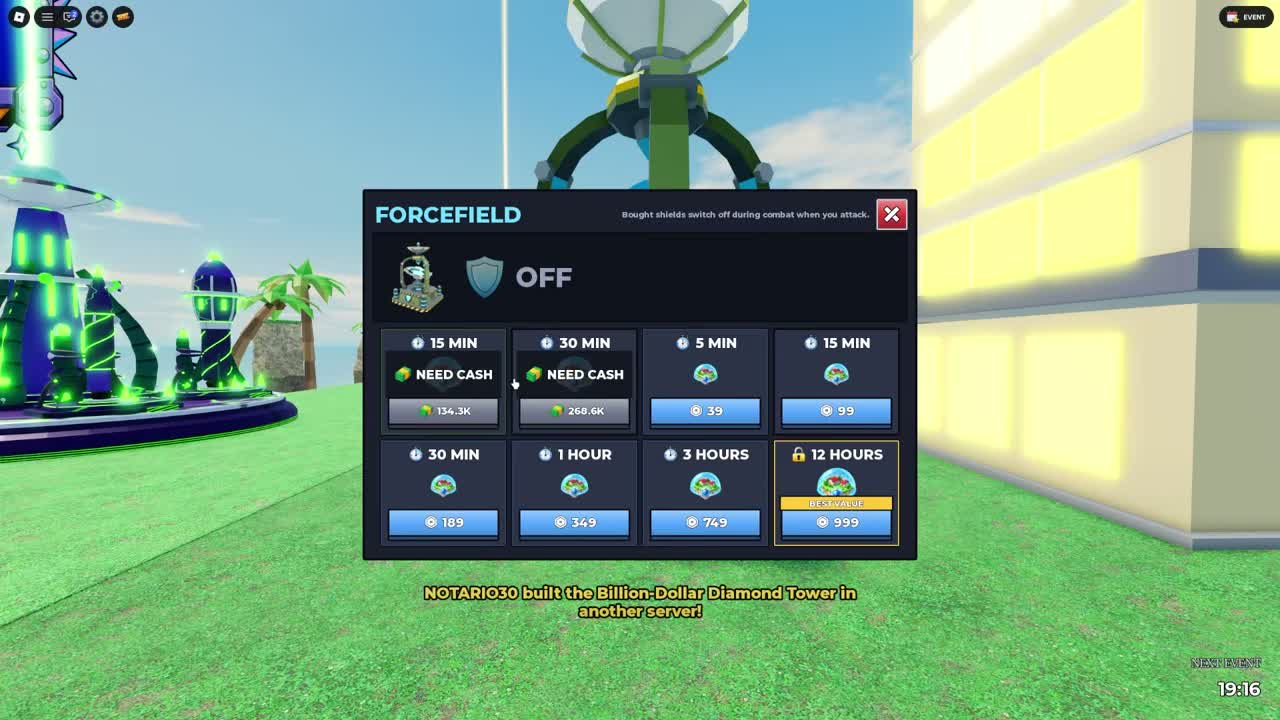
Cash prices differ across recordings and change during the newer session. One newer panel shows 15 minutes for 20K and 30 minutes for 50K. A later OFF screen shows 347K and 694.1K with a 22:38 timer. The pricing formula is unverified; use the amount and availability on your panel.
The newer Robux options show 5 minutes for 19, 15 minutes for 39, 30 minutes for 79, 1 hour for 139, 3 hours for 299 and 12 hours for 399. These differ from the older screen. Read the live platform confirmation before paying; dated snapshots are not guaranteed current prices.
OFF, NEED CASH, a purchase-card timer and SHIELD ON are different states. Check cash and the button timer before trying another purchase. Confirm an active countdown after a successful renewal.
Check a rival before launching
Check target protection and anti-air messages before sending another shot.
- Success check
- You can identify a vulnerable target or an interception that explains failure.
- If it remains unclear
- Pause repeated spending and use the failed-launch checklist.
Read the supporting evidence
§Check a rival before launching#
The video shows attacks against an unshielded player and a notification that a Basic Missile was shot down by anti-air. A failed strike requires checking interception as well as shields.
The ALLIANCE button and a country-selection screen are visible. The presenter recommends alliances to reduce retaliation, but friendly-fire prevention is not demonstrated. Country-specific bonuses remain unverified.
After an attack
Restore income, then check combat status before leaving.
- Success check
- Income is working and the HUD no longer shows the cash-loss warning.
- If it remains unclear
- Read the live warning and wait if it still marks the session in combat.
Read the supporting evidence
§After an attack#
After an attack, inspect which income structures remain. Restore an affordable earning building and verify placement before financing another expensive salvo.
Leave enough clear grid space to place items and reach the generator and launch interactions. The newer video demonstrates an overlap warning, while its presenter recommends spacing for safety. No precise anti-blast distance has been measured, so a particular gap is not promised to prevent splash damage.
Recheck the generator, cash-button cooldown and combat HUD before leaving. Exact persistence, refunds, prestige effects and replacement costs remain unverified. Establish what was lost in your own interface before rebuilding.
Anti-air limits and interception
Check the five-unit anti-air limit and the current shop price before placing another defense.
- Success check
- The defense is placed and the plot remains within its displayed limit.
- If it remains unclear
- Read the cap warning and avoid buying a duplicate to solve a placement limit.
Read the supporting evidence
§Anti-air limits and interception#
The BUILDINGS shop footer says Anti-air: 5 total per plot in both inspected views. This is a recorded placement cap. It does not prove five are required or that five stop every attack. Read the current unit card and allowance before buying.
A Basic Missile is reported as shot down by another player's anti-air in the older session. This confirms an interception event, without establishing a success percentage, reload time, range or complete list of countered weapons. An unshielded target can still stop a shot.
Protect a working income loop, inspect the defensive unit, then buy within the visible cap and your budget. If your base is hit, check both forcefield state and incoming-strike notifications. Anti-air and a timed forcefield are distinct defenses.
When the cash shield button has a timer
Read the OFF state, timer and combat warning before attempting a shield renewal.
- Success check
- An active countdown confirms that protection has resumed.
- If it remains unclear
- Wait for the displayed restriction to clear and check the purchase response before retrying.
Read the supporting evidence
§When the cash shield button has a timer#
The later newer-video panel shows OFF while both cash options display a 22:38 timer. At that moment those buttons are not shown as immediately ready purchases. Read the live timer and message before waiting or choosing another payment option. The footage does not establish that reconnecting clears this restriction.
Some commentary recommends leaving and returning later. Check that suggestion against the combat warning: the older HUD warns of a cash loss when leaving in combat. Wait until your current interface no longer shows that penalty warning before reconnecting as routine troubleshooting.
Scope and sources
Official facts and reported interface details are identified in the text. Exact current statistics and code payouts remain untested.
- Recorded UI and calculated examples are dated observations. Check your current interface before spending.
- No first-hand account test. Remaining gaps are listed in Sources & Verification.