Official facts + expanded gameplay review
Nuke A Country Beginner Guide
A first-session route for Nuke A Country: find the correct experience, use the code menu, earn cash and build your base.
Quick answer
Confirm the developer, check ZEROHOUR, learn how the shop places a weapon, and alternate destruction income with base investment.
Continue readingWork through the steps
Use the current on-screen prompts and confirm each result.
1. Join the correct experience
Open the official Roblox experience and check the developer name.
- Success check
- The listing shows Wow that's crazy!! and the correct title.
- If it remains unclear
- Use the official game link in the source block if search results mix games.
Read the supporting evidence
§1. Join the correct experience#
Open Nuke A Country by Wow that's crazy!! on Roblox. The root Place is 103482292591717. Similar names and unrelated country-conquest games appear in searches, so use the developer name to check your destination.
The official game description confirms destruction cash, base income upgrades and attacks on other player bases. It does not publish a complete control list or an optimal purchase order.
2. Check the code menu before buying
Open CODES and try the currently announced ZEROHOUR code.
- Success check
- A response explains whether the claim succeeded; check the resulting balance or inventory.
- If it remains unclear
- Use the code guide to distinguish an invalid code from an already-redeemed claim.
Read the supporting evidence
§2. Check the code menu before buying#
The current official announcement names ZEROHOUR. Open the in-game Codes menu, enter the code exactly, and read the response before assuming the reward arrived. The redemption menu steps are reported by guide coverage; the code's current payout has not been tested here.
If the menu says the code was already redeemed, do not keep submitting it. If it says invalid or expired, check spelling and the current official description. See the code guide for the known conflicts.
3. Learn one launch, then grow income
Buy in NUKES, place on a clear grid, approach LAUNCH, select the target, then FIRE.
- Success check
- The targeting interface opens and the launch completes.
- If it remains unclear
- Resolve OVERLAPS ANOTHER BUILDING or SELECT TARGET before buying another weapon.
Read the supporting evidence
§3. Learn one launch, then grow income#
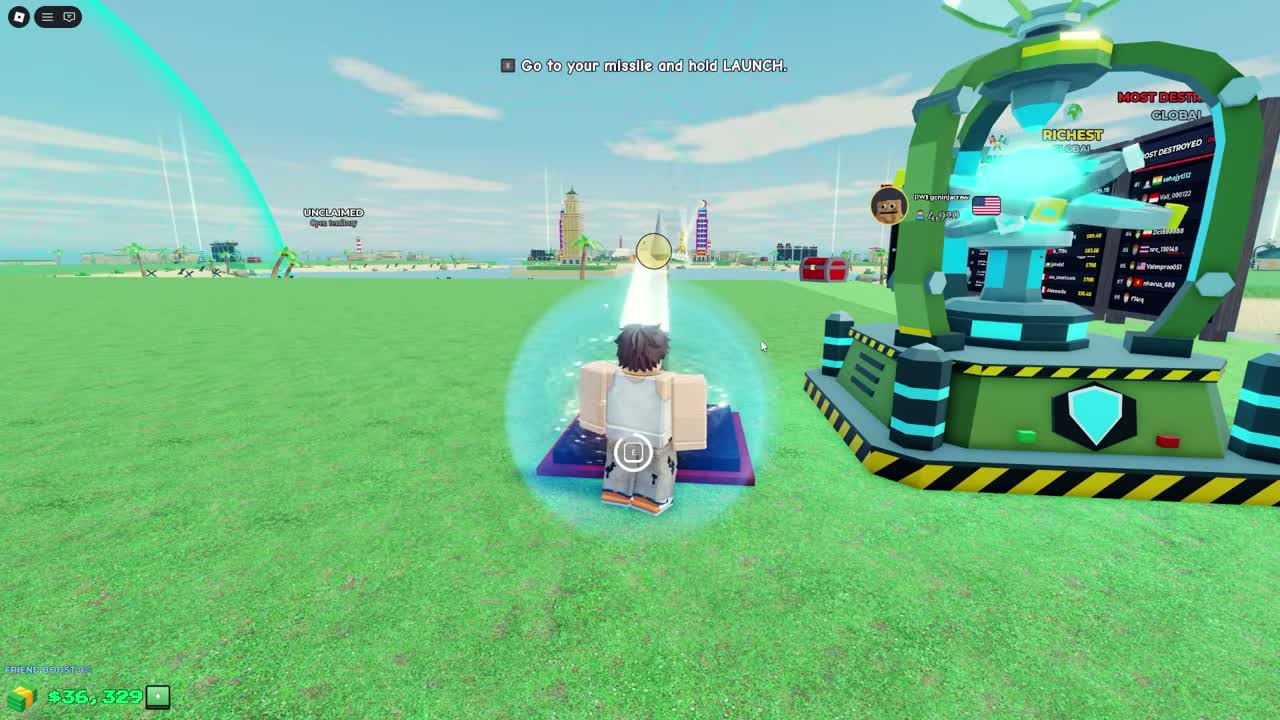
Follow the highlighted tutorial before spending on a large arsenal. The newer recording shows LAUNCH first, missile placement on your island, another launch, selecting a house in the hotbar, placing it, buying another house in SHOP, and buying and placing a Basic Missile. Country selection follows. Follow a different live prompt if the tutorial changes.
Open SHOP at the bottom of the screen. Choose NUKES for missiles or BUILDINGS for income structures. A purchase enters the hotbar and still needs placement. Select its slot, move its footprint onto your island grid, confirm PLACE, approach the weapon and hold the E interaction or use the displayed LAUNCH button.
In the targeting view, choose a position on the target island before pressing FIRE. The newer recording shows SELECT TARGET when the player tries to fire without a selection. RETRY and CANCEL are visible controls. Check target protection before confirming an expensive launch.
4. Reinvest without spending the whole balance
Buy and place an income building, then wait through a payout interval.
- Success check
- The placed building remains on the grid and the balance reflects its income.
- If it remains unclear
- Check placement, payout timing and the current shield or combat warning.
Read the supporting evidence
§4. Reinvest without spending the whole balance#
The tutorial says houses earn cash every 5 seconds, while cards display income per second. Place the building and stop spending briefly to compare a full payout interval. Two recorded Small Houses total 6.4 per second; over 5 seconds that corresponds to 32 before modifiers. This is a calculation from card values, not a measured guaranteed payout.
A useful early route is one successful low-cost launch, a working income building, then another earn-and-reinvest cycle. In a worked 500-cash budget, a Basic Missile costs 200 and two Small Houses cost 200 together, leaving 100. This is a purchase example using recorded prices, not the starting-cash amount.
Check the shield countdown before spending the reserve on attacks. Bought shields warn that attacking during combat switches them off. The older HUD also warns that leaving in combat loses 45% cash. Read your live warning before reconnecting.
Check ready rewards before another purchase
Inspect the right-hand gift timer and claim an available reward.
- Success check
- The reward result appears and claimed items can be checked in the hotbar or bag.
- If it remains unclear
- Wait for the visible timer and distinguish free claims from paid STORE offers.
Read the supporting evidence
§Check ready rewards before another purchase#
Look for the gift icon on the right. In the AccelToWin recording it reaches a 5-minute reward, followed by a rewards panel and a supply-crate opening. A Hydra appears in that particular result. Check the hotbar or bag after claiming; one opening does not establish a guaranteed Hydra or a drop rate.
Daily rewards and timed session gifts are separate checks. The official listing advertises daily rewards, while the recording demonstrates a timed gift. Use each panel's own claim state and timer. STORE also contains paid packs, boosts and shields, so every visible offer is not a free claim.
Fix placement before buying another item
Move or rotate the footprint onto a clear part of the grid before confirming PLACE.
- Success check
- The overlap warning clears and the purchased item appears on the plot.
- If it remains unclear
- Cancel placement and choose another clear position if the red warning remains.
Read the supporting evidence
§Fix placement before buying another item#
A red footprint marked OVERLAPS ANOTHER BUILDING means that location is obstructed. Move the preview to clear island space, use ROTATE if its footprint needs another orientation, and confirm PLACE once the obstruction is cleared. CANCEL leaves placement mode; check your hotbar before buying a duplicate.
Buying and placing are separate steps. The recorded shop confirmation says the purchased building is in your hotbar. Close SHOP and check that slot if a purchase seems missing. A house still in the hotbar has not become a placed income structure.
Questions and answers
Is Nuke A Country a single-player game?
The official listing describes competing with other players and destroying player bases. The checked API snapshot listed a six-player server limit; that limit may change.
Do countries give different bonuses?
Country selection appears in guide coverage, but country-specific bonuses have not been verified. Choose without assuming a hidden income or damage advantage.
Scope and sources
Official facts and reported interface details are identified in the text. Exact current statistics and code payouts remain untested.
- Recorded UI and calculated examples are dated observations. Check your current interface before spending.
- No first-hand account test. Remaining gaps are listed in Sources & Verification.