Official facts + expanded gameplay review
Nuke A Country Codes
Check the officially announced ZEROHOUR code, reported older codes and the steps to take when a redemption fails.
Name reference
2 recordsOfficial facts and reported interface details are identified in the text. Exact current statistics and code payouts remain untested.
2 / 2 codes
ZEROHOUROfficial Roblox description
- Reward
- Cash and free items; full quantities unverified
- Verification
- Official announcement; recorded overlay
NUKEGame-linked October 15 recording
- Reward
- 2,000 cash indicator; full item details unverified
- Verification
- REDEEMED! visible in recorded session; acceptance can change
Reference context
Official listing checked October 16. NUKE receipt inspected in a recording uploaded October 15. No first-hand account redemption.
ZEROHOUR remains advertised in the official description checked October 16, with cash and free items but no numeric payout. Newer game-linked footage enters it and shows a reward overlay, although editing covers part of the result.
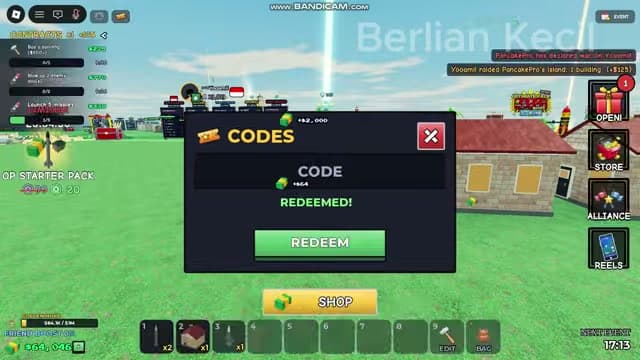
NUKE has a readable receipt in that newer recording: it is typed into CODES and followed by REDEEMED! A 2,000-cash indicator is visible during redemption. This is another player's recorded result, with no first-hand account test or guarantee of perpetual validity.
Quick answer
Use the top-row voucher icon, enter ZEROHOUR or NUKE and press REDEEM. ZEROHOUR is officially announced; NUKE has a readable recorded REDEEMED! receipt. Check your own response and inventory.
Continue reading§How to redeem a code#
Let the game load and finish any tutorial prompt covering the interface. Use the ticket/voucher icon in the top row next to Settings to open CODES. The right-hand gift icon is a separate reward menu.
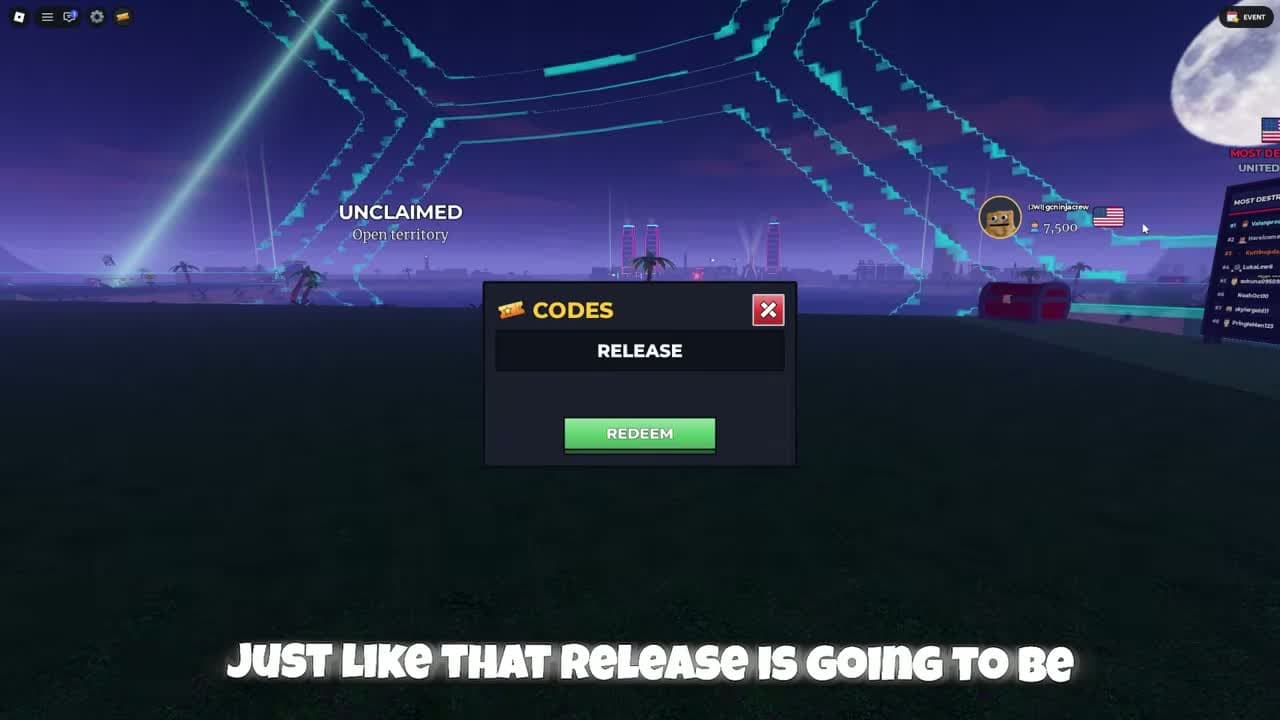
Enter one code in CODE without quotation marks or pasted spaces. Start with officially announced ZEROHOUR, then try NUKE if your account has not claimed it. Press the green REDEEM button once and wait for its response.
The recorded NUKE claim shows REDEEMED! in green, clears the entry and opens a reward display. Check cash and the hotbar or bag because rewards can include items. An empty input alone is insufficient proof of success; record the actual response if it differs.
§Reported codes and conflicting lists#
RELEASE, BOOM and NEWUPDATE occur in older coverage or entry footage without an established readable success receipt. Their current working and expired status is unconfirmed.
The newer NUKE receipt supports NUKE in that recorded session. It does not validate every code read out in an older video. The official description publishes no expiry date; recheck its current announcement after a failure.
On small screens, swipe the table to compare all columns.
| Candidate | Evidence | Current status |
|---|---|---|
| RELEASE | Older guide or code-entry footage | Current status unconfirmed |
| BOOM | Older guide or code-entry footage | Current status unconfirmed |
| NEWUPDATE | Older guide or code-entry footage | Current status unconfirmed |
§When a code does not work#
If no code window opens, use the top-row voucher icon; the timed gift and STORE open different panels. Finish an obstructing tutorial prompt before trying the voucher again.
If the entry is rejected, retype just the code characters and compare with the official description. Keep an already-claimed response separate from an invalid or expired response. These are diagnostic categories; the exact live wording takes priority.
If REDEEMED! appears but cash seems unchanged, check the hotbar and bag for items and avoid making purchases during the check. If no receipt appears, let the current request finish before trying once more. No level requirement, group requirement or guaranteed rejoin fix has been verified.
Questions and answers
Which codes have the strongest evidence?
ZEROHOUR is officially advertised. NUKE is typed and followed by REDEEMED! in newer game-linked footage. Neither guarantees acceptance for every later account or server.
Does NUKE give 2,000 cash?
A 2,000-cash indicator appears during the recorded NUKE redemption. The complete extra item quantities are unverified. Check your current result for the full reward.
Scope and sources
Official facts and reported interface details are identified in the text. Exact current statistics and code payouts remain untested.
- Recorded UI and calculated examples are dated observations. Check your current interface before spending.
- No first-hand account test. Remaining gaps are listed in Sources & Verification.